-
When Your Test Setup Goes Down Mid-Week
-
Step 1: Confirm the Exact Part Number and Revision
(Don't Trust the Pull-Quote) -
Step 2: Jump to Niche Distributors, Not Just the Big Catalogs
(48 Hours vs. 8 Weeks) -
Step 3: Verify Calibration and Certification Status
-
Step 4: Check Driver & Software Compatibility (Again)
-
Step 5: Test, Document, and Plan for the 'Next Failure'
-
Common Mistakes That Kill the 48-Hour Window
When Your Test Setup Goes Down Mid-Week
If you've ever had a PXI module or a CompactDAQ chassis die on a Tuesday afternoon, you know that feeling. There's a scheduled validation run on Thursday morning, the engineering director is checking in, and the lead time for a new module from standard distribution channels is showing as '8–12 weeks.'
This checklist is for that specific moment. It's for the engineer or lab manager who needs a replacement National Instruments module—whether it's a 1507 insulation tester for a harness check, a replacement encoder AFM60A for a motion control rig, or a simple 4-channel thermocouple input module for a data logger system—within a 48-hour window. Not two weeks, not 'expedited.' Forty-eight hours.
I've handled over 200 rush orders for instrumentation equipment in the last three years, including same-day turnarounds for aerospace and automotive tier-1 clients. This is the step-by-step process that works, along with the mistakes that can eat up your deadline.
Step 1: Confirm the Exact Part Number and Revision
(Don't Trust the Pull-Quote)
It sounds basic, but this is where most delays start. A colleague pulls a module from a storage bin that says 'NI 9214' and hands it over. You install it, and LabVIEW doesn't recognize it. Turns out it's the 'X' revision, not the one your configuration file expects. Or worse, it's a counterfeit unit sourced from a marketplace.
What to do: Physically verify the part number and revision on the module's label. Match it against your original purchase order or the NI MAX configuration backup. Check the NI website for download compatibility – sometimes a newer driver version (like NI-DAQmx 24.0) supports a different set of hardware revisions than your current deployment.
For something like an encoder AFM60a, confirm the output protocol (SSI, BiSS, etc.) and the shaft type. A mismatched connection interface adds days to a rush repair.
Step 2: Jump to Niche Distributors, Not Just the Big Catalogs
(48 Hours vs. 8 Weeks)
Your first instinct might be to check the big franchised distributors. That's fine for standard lead times. For a 48-hour window, you need to call specialized industrial surplus or new-surplus distributors who carry active inventory. These are companies that physically stock NI hardware from corporate asset liquidations or overstock purchases.
I learned this the hard way in March 2024. We needed a specific 1507 insulation tester to complete a high-potential test procedure for a client. The big distributor showed 'in stock' but the actual ship date was five days out. We called a specialized surplus house we'd never used before, paid $180 extra in rush shipping (on top of the $350 base cost), and it landed on the bench 26 hours later. The client's alternative was a $50,000 penalty clause for a delayed delivery.
Key: Ask the supplier to bench-test the module before shipping. Most good surplus houses can do a quick functional test and provide a screenshot of the module being recognized in MAX.
Step 3: Verify Calibration and Certification Status
In a rush, it's tempting to grab any working module that fits. But if your data is going into a regulatory report or a production sign-off, an uncalibrated module is practically useless. You'll spend more time testing the test equipment than testing your product.
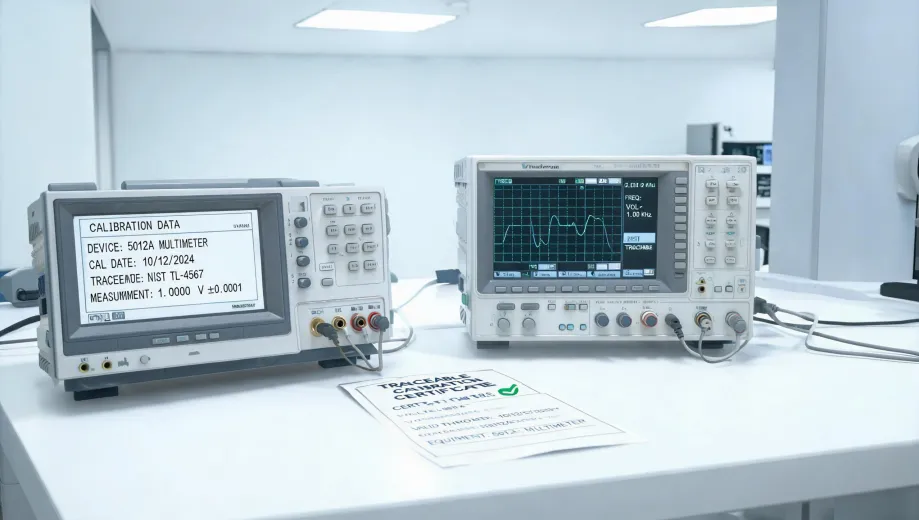
The checklist item: Ask for the calibration certificate. For PXI modules and DAQ cards, a standard traceable calibration to NIST is often required. For a 1507 insulation tester, verify the calibration date and the measurement uncertainty. Some surplus equipment comes with 'current calibration,' some doesn't. We almost bought a module that was 13 months past calibration (which, honestly, is common for corporate surplus). That would have added a week to re-calibrate it locally.
"This was accurate as of Q4 2024. The surplus market changes fast, so verify current availability and certs before assuming a module is ready. "
Step 4: Check Driver & Software Compatibility (Again)
You've got the hardware in hand (or in the mail). Now the common gotcha: the driver version. NI's software ecosystem is powerful, but it's also version-sensitive. A module purchased from an unplanned source might require a newer version of NI-DAQmx, or it might be a legacy part that needs a specific, older runtime.
Practical step: Before the hardware arrives (use the tracking number), log into the NI website and download the driver package that matches the module's exact model and revision. If you're sourcing an older module because you can't find a current one, be prepared for a potential LabVIEW headache (think VIs that won't load or broken wires in your block diagram).
Personally, I'd rather spend 20 minutes confirming driver compatibility on a Thursday afternoon than get surprised on Friday morning. The extra work upfront avoids the frantic search for a legacy driver installer.
Step 5: Test, Document, and Plan for the 'Next Failure'
Once the module is installed and recognized, run a quick verification test. Compare the measurements from a known reference source (a calibrated signal generator or a precision resistor) against the data from your new module. Log the results. If you're running an automated test system, update your MAX configuration and save a backup.
One more thing: Serialize this event. Add a note to your maintenance log: "Module X (S/N 12345) failed on [date]. Replaced with S/N 67890 from [vendor]." The next time you face a 48-hour deadline, you'll know exactly where to look first.
Common Mistakes That Kill the 48-Hour Window
- Only checking one source. In a rush, you need to call 3 to 5 distributors simultaneously. This worked for us, but our situation was a regulated industry client with a full 5S lab setup. If you're a seasonal business with demand spikes, the calculus might be different (you might just need a lower-tier module).
- Assuming 'New' in box means it's ready to run. We once received a pristine, sealed NI C-Series module that looked perfect. It had been sitting on a shelf for three years. The internal battery for the real-time clock was dead. So glad we tested it before installing.
- Forgetting to check the backplane power budget. A newer, more capable module might draw more current from the chassis than your older failed unit. Check the combined power draw. A short here can bring down the entire system (dodged a bullet on a 14-slot PXIe-1075 chassis where we almost swapped in a high-power digitizer without checking).
Bottom line: Getting a replacement NI module in 48 hours is doable if you stop relying on standard supply chains and start acting like an ADAT triage nurse. Confirm the hardware, source aggressively, verify calibration, check software, and test immediately. The tools exist (NI's driver compatibility lists, surplus distributors, expedited calibration services). It's the process that needs to be followed, not just hoped for.